I wanted a coding agent to run a few commands as root on a server. The usual options all bother me:
- Give it the password. Now it has the password, forever.
- Add a
NOPASSWDrule to sudoers. Permanent config, and it applies to every process of that user, not just the agent. - Share a tmux session. The agent has to scrape the screen and guess the exit code.
What I wanted was closer to this: I start something on the server, the agent can run commands while it’s running, and when I press Ctrl-C the access is gone.
It turns out sshd can already do that with a short bash script around it. The full script is at the end.
The idea: whoever starts sshd decides the user#
When you SSH into a machine, the system sshd runs as root. It checks your key, then switches to your user (setuid) and runs your command.
A non-root sshd can’t switch users. It can only run commands as the user that started it. Normally that’s a limitation. Here it’s the whole trick: start sshd as the user you want commands to run as, and let one key in.
| Start it with | sshd and the agent’s commands run as |
|---|---|
bash throwaway-sshd.sh | you |
sudo bash throwaway-sshd.sh | root |
sudo -u jon bash throwaway-sshd.sh | jon |
So sudo is still the gate. You type the sudo password once, in your own terminal, and the agent never sees it. The agent only gets a key that works for as long as that terminal is open.
The whole picture#
The throwaway sshd listens on 127.0.0.1 only, so it doesn’t open a new port to the network. The agent reaches it by jumping through the SSH access it already has.


There are two SSH connections, one inside the other:
- The outer one logs you in as yourself on port 22, the way you always do.
- The inner one goes through it to
127.0.0.1:2223and authenticates with a separate key,~/.ssh/throwaway, that only the throwaway sshd accepts.
OpenSSH does this with a jump host: ProxyJump in the config, or -J on the command line.
How the jump host works#
ssh -J you@server -p 2223 -i ~/.ssh/throwaway \
    root@127.0.0.1 'systemctl restart nginx'
This reads as: log in to you@server first, and from there reach 127.0.0.1:2223 and log in as root.
Step by step:
- The outer connection. Your ssh client connects to port 22 and logs in as you with your usual key. It doesn’t start a shell there.
- A channel instead of a shell. The client asks the server’s sshd to open a TCP connection to
127.0.0.1:2223and pass the bytes back and forth over the SSH connection. This is the same port forwarding behindssh -L.127.0.0.1here means the server’s loopback, not your machine’s, because the server is the one making the connection. That’s why the inner host is127.0.0.1. - The inner connection. The client starts a second, complete SSH session over that channel: a new handshake with the throwaway sshd, the throwaway key, and login as root. The system sshd only passes encrypted bytes along. It can’t read the root session, and it never sees the throwaway key.
- The command. Inside the inner session, the client runs the command and gets back stdout, stderr and the exit status, just as with a direct connection.
-J you@server is shorthand for this:
ssh -o ProxyCommand='ssh -W %h:%p you@server' \
    -p 2223 -i ~/.ssh/throwaway root@127.0.0.1 'id'
ssh -W host:port opens that channel and connects it to its own stdin and stdout. The ssh running id then speaks SSH through it as if it were a socket.
Two things follow from this:
Every new connection does two handshakes. That’s about half a second per command.
ControlMasterkeeps the connection open so later commands skip both (timings below).The system sshd must allow forwarding. If it has
AllowTcpForwarding no,-Jfails withadministratively prohibited. You can still get through ifncis installed on the server, since that’s an ordinary command run as you:shssh -o ProxyCommand='ssh you@server nc 127.0.0.1 2223' \ -p 2223 -i ~/.ssh/throwaway root@127.0.0.1 'id'
Running it#
Once, on your machine, make a key for this and copy the script over:
ssh-keygen -t ed25519 -N '' -C throwaway -f ~/.ssh/throwaway
scp throwaway-sshd.sh you@server:
On the server, start it with the public key and a port:
sudo bash throwaway-sshd.sh 'ssh-ed25519 AAAA... throwaway' 2223On your machine, add a host to ~/.ssh/config:
Host server-root
  HostName 127.0.0.1
  Port 2223
  ProxyJump you@server
  IdentityFile ~/.ssh/throwaway
  IdentitiesOnly yes
  StrictHostKeyChecking no
  UserKnownHostsFile /dev/null
  LogLevel ERROR
  ControlMaster auto
  ControlPath ~/.ssh/cm-%C
  ControlPersist 10m
The last three lines matter for an agent that runs dozens of small commands. The first ssh does both handshakes and stays open for 10 minutes, and every later call reuses it:
| Measurement | How | Result |
|---|---|---|
ssh root@server-root true, new connection | time, 1 run | 0.54 s |
| Same, reusing the open connection | hyperfine, 10 runs | 36 ms ± 5 ms (29–44 ms) |
5 MiB scp upload, new connection | time, 1 run | 1.19 s, sha256 matches |
Now the agent can run commands like any other CLI tool:
ssh root@server-root 'systemctl restart nginx'; echo $?
scp big.iso root@server-root:/srv/
Ctrl-C on the server, and the next ssh root@server-root fails.
What the script does#
The script does four things.
1. Make a private temp dir with a host key and the client key#
dir=$(mktemp -d)
chmod 700 "$dir"
ssh-keygen -q -t ed25519 -N '' -C throwaway-host -f "$dir/host_key"
printf '%s\n' "$pubkey" > "$dir/authorized_keys"
Every run gets a new host key, so the client config turns off host key checking. The script prints the fingerprint if you want to compare it by hand.
2. Write a minimal sshd_config#
ListenAddress 127.0.0.1
Port $port
HostKey $dir/host_key
AuthorizedKeysFile $dir/authorized_keys
AllowUsers $user
PermitRootLogin prohibit-password
PasswordAuthentication no
KbdInteractiveAuthentication no
UsePAM no
StrictModes no
PidFile none
LogLevel VERBOSE
Subsystem sftp internal-sftp
The ones that aren’t obvious:
| Option | Why |
|---|---|
ListenAddress 127.0.0.1 | Nothing new is reachable from the network. You need SSH access to the box first. |
AllowUsers $user | AuthorizedKeysFile is a fixed path, not per user. Without this line the key works for any username, and a root sshd would happily log you in as anyone. |
PermitRootLogin prohibit-password | Root may log in, but only with a key. |
StrictModes no | The files live under /tmp, which is world-writable, and sshd would refuse them. The dir itself is 0700. |
UsePAM no, PidFile none | Needed so a normal user can run sshd at all. |
Subsystem sftp internal-sftp | scp and sftp work, without needing the system’s sftp-server path. |
Then sshd -t checks the config before anything starts.
3. Run sshd in the foreground#
"$sshd" -D -e -f "$dir/sshd_config" &
sshd_pid=$!
-D keeps it from daemonizing and -e sends its log to stderr, so you see each login in the terminal you started it from.
4. Clean up everything on exit#
This part took the most attempts. Each SSH connection is handled by its own sshd child process, and the command runs under that:
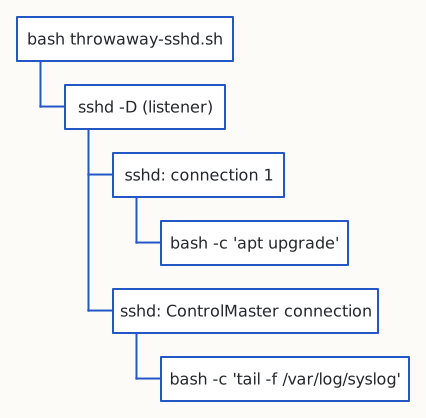
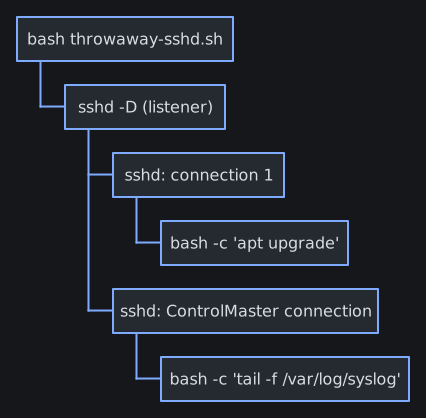
Killing the listener stops new connections, but open ones keep going. With ControlMaster there’s one long-lived connection that every ssh call reuses, so after Ctrl-C the agent could still run commands through it.
So on exit the script walks the process tree under the listener and kills all of it:
descendants() {
  local c
  for c in $(pgrep -P "$1"); do
    echo "$c"
    descendants "$c"
  done
}
stop() {
  trap - EXIT
  kill -TERM "$sshd_pid" $(descendants "$sshd_pid") 2>/dev/null || true
  wait "$sshd_pid" 2>/dev/null || true
  rm -rf "$dir"
}

trap stop EXIT
trap 'exit 130' INT
trap 'exit 143' TERM
wait "$sshd_pid"
Ctrl-C turns into exit 130, which runs the EXIT trap, which kills the tree and deletes the temp dir with the keys in it.
Why SSH fits#
You could write a small server that takes commands over a socket and runs them. But SSH already has everything such a server would need:
- stdout and stderr kept separate
- the remote exit code (
ssh ... 'false'; echo $?prints1) - signals, ptys when you want one
- file transfer with
scp/sftp, resumable withrsync --partial - key auth, and a client that’s already installed everywhere
And agents already know how to use ssh.
Limits#
- Any process of yours can use it while it runs, not only the agent. Keep it running only as long as you need it.
- The log shows logins, not commands. sshd logs that a command started, not what it was.
- A command that daemonizes itself (
setsidplus a double fork) leaves the process tree and survives Ctrl-C.
The full script#
throwaway-sshd.sh (72 lines)
#!/usr/bin/env bash
# Throwaway sshd on 127.0.0.1 that lets one key in as the user running it.
# Stops on Ctrl-C and deletes its keys and config.
#
#   bash throwaway-sshd.sh 'ssh-ed25519 AAAA... comment' [port]          # as yourself
#   sudo bash throwaway-sshd.sh 'ssh-ed25519 AAAA... comment' [port]     # as root
#   sudo -u jon bash throwaway-sshd.sh 'ssh-ed25519 AAAA...' [port]      # as jon
set -euo pipefail

pubkey=${1:?usage: $0 'ssh-ed25519 AAAA... comment' [port]}
port=${2:-2223}
sshd=${SSHD:-/usr/sbin/sshd}
user=$(id -un)

dir=$(mktemp -d)
trap 'rm -rf "$dir"' EXIT
chmod 700 "$dir"
ssh-keygen -q -t ed25519 -N '' -C throwaway-host -f "$dir/host_key"
printf '%s\n' "$pubkey" > "$dir/authorized_keys"

# StrictModes no: $dir is under world-writable /tmp, but is itself 0700.
# AllowUsers: AuthorizedKeysFile is shared, so without it the key works for any user.
cat > "$dir/sshd_config" <<EOF
ListenAddress 127.0.0.1
Port $port
HostKey $dir/host_key
AuthorizedKeysFile $dir/authorized_keys
AllowUsers $user
PermitRootLogin prohibit-password
PasswordAuthentication no
KbdInteractiveAuthentication no
UsePAM no
StrictModes no
PidFile none
LogLevel VERBOSE
Subsystem sftp internal-sftp
EOF

"$sshd" -t -f "$dir/sshd_config"

cat <<EOF
serving $user on 127.0.0.1:$port, Ctrl-C to stop
host key: $(ssh-keygen -lf "$dir/host_key.pub")
from your machine (replace the -J host if needed):
  ssh -J ${SUDO_USER:-$user}@$(hostname -f 2>/dev/null || hostname) -p $port -i ~/.ssh/throwaway \\
      -o IdentitiesOnly=yes -o StrictHostKeyChecking=no -o UserKnownHostsFile=/dev/null \\
      $user@127.0.0.1 'id'
EOF

# Open connections (e.g. a ControlMaster) outlive the listener, so on exit kill
# the whole tree under it. A self-daemonizing command (setsid + double fork) escapes.
descendants() {
  local c
  for c in $(pgrep -P "$1"); do
    echo "$c"
    descendants "$c"
  done
}
stop() {
  trap - EXIT
  # shellcheck disable=SC2046 # pids are integers
  kill -TERM "$sshd_pid" $(descendants "$sshd_pid") 2>/dev/null || true
  wait "$sshd_pid" 2>/dev/null || true
  rm -rf "$dir"
}

"$sshd" -D -e -f "$dir/sshd_config" &
sshd_pid=$!
trap stop EXIT
trap 'exit 130' INT
trap 'exit 143' TERM
wait "$sshd_pid"